
How to Register a Digital Signature Certificate on the MCA Portal
Landed here from an MCA error message?
Three MCA errors point back to DSC registration. If you are looking at one of these, this page is the fix.
- “DSC not registered with MCA” — the certificate has never been associated with your role on the portal, or it was associated with an earlier certificate. A renewed DSC is a new certificate and has to be registered again, even though the person and the DIN have not changed. This is the most common cause after a renewal.
- “Digital signature verification failed. Please affix a valid DSC” — a signature was applied but the portal will not accept it. Usually the certificate used is not the one registered against that DIN or PAN, it has expired, or a different person signed than the form expects.
- “The required DSC have not been affixed” — no signature was detected on the form at all. This is normally a signing-step problem rather than a registration problem: the file was signed in a separate PDF viewer instead of through the portal, the signature field was left blank, or the copy uploaded was not the signed copy.
If the message is instead about emSigner failing to start or connect, that is the signing utility rather than the registration — see our emSigner installation and troubleshooting guide.
Details must match the DIN or PAN record exactly
The single most common reason a registration is rejected is a mismatch between the name on the certificate and the name held against the DIN or PAN. The certificate carries the name as the certifying authority issued it; the portal checks it against its own record. A middle name present in one and absent in the other, an expanded initial, or a changed surname after marriage will all fail, and the message you get back will not say so.
Before you start, open the certificate and read the name on it, then compare it character by character with the DIN or PAN record. Fix whichever one is wrong first. Registering against a mismatched record does not work and cannot be forced.
Any person who is a Director of a Company or a Designated Partner of a LLP or a Professional like Chartered Accountant or Company Secretary must register DSC on MCA portal to file forms. If a DSC is not registered on the MCA portal, the person would not be able to file any forms. As a Director’s or Partner’s DSC is required for filing annual returns and various other forms, its important to register the DSC on MCA portal after incorporation. In this article, we look at the procedure to register DSC on MCA Portal in detail.
Digital Signature Certificate (DSC)
Digital Signature Certificate or DSC is an encrypted electronic signature of a person. Digital signatures are stored in encrypted USB drivers and can be accessed only with a password. Class 2 DSC is required for filing various types of returns with the Government like Annual Return, Income Tax Return, GST Return and completing other statutory filings. The main vendors for digital signature in India are Sify, E-Mudhra and N-Code.
How long a DSC stays valid
Unlike PAN or Director Identification Number (DIN), DSCs are not valid for life. DSCs are usually valid for one or two years and at end of its validity must be renewed. Once a DSC is renewed, the process to register DSC on MCA portal must be repeated to register the new DSC.
How to register a DSC on the MCA portal
Any Director or Designated Parter or Professional intending to file a form on the MCA portal must first register the DSC. Registration of DSC on MCA Portal allows MCA to to know the identity of the person who is using a Digital Signature Certificate and prevent unauthorised use. The following steps can be followed to register DSC on MCA portal.
Step 1: Go to Ministry of Corporate Affairs official website to register DSC.
Step 2: Click on MCA Services and then select Associate DSC option from drop down menu.
Step 3: Select the Appropriate Role of the person for whom DSC is to be registered.
In case of Director/Designated Partner – Select Director to update DIN/DPIN details.
In case of Manager, Practicing Professional & Authorised Representative – PAN based details are required to register DSC.
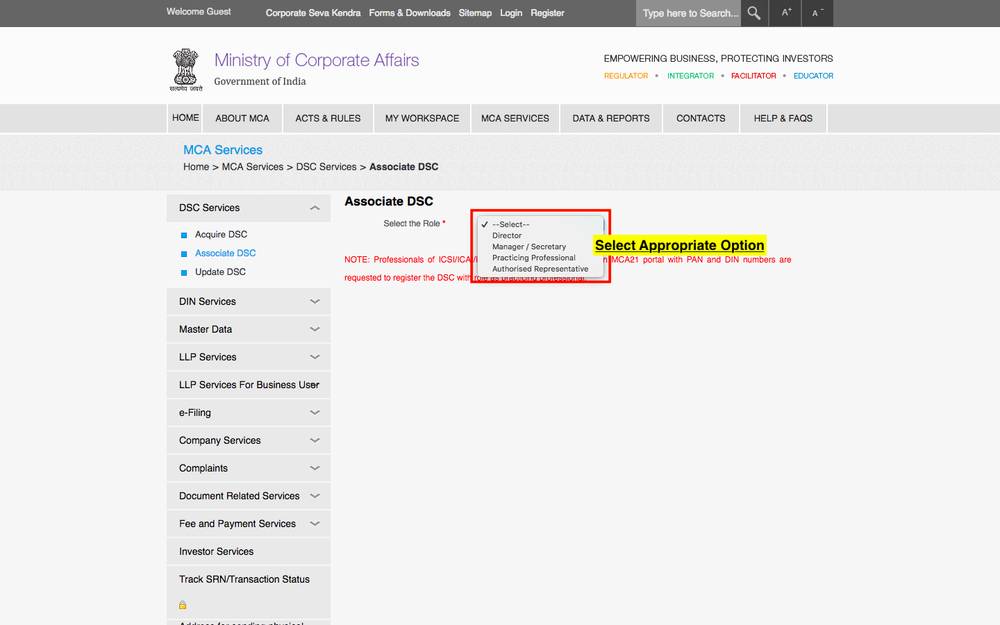
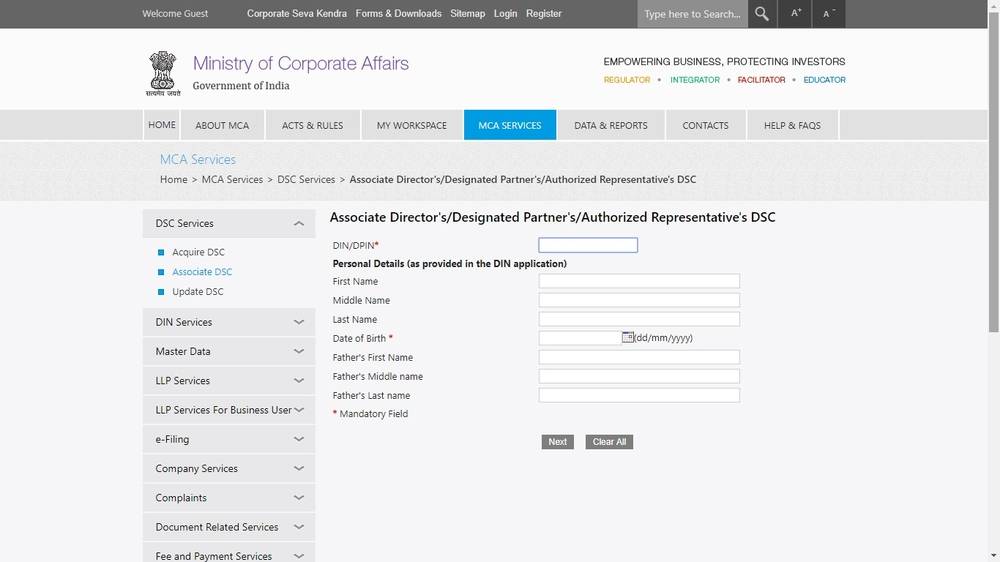
Step 4: Enter the details requested in the next page. Details should be same as in DIN/PAN.
Step 5: In the next screen you will be asked to enter your e-mail id and select the digital signature certificate.
To select digital signature certificate, download & install MCA E-Signer. You can download the MCA E-Signer from the link provided in the same screen.You can download the MCA E-Signer from the link provided in the same screen.
Note: To install MCA E-Signer in to your system, the operating system should be Windows 10 & it should have JAVA 10 & above.
On the system requirement note above: MCA has changed the supported operating system and Java version more than once, and the requirement shown on the portal on the day is the one that governs. If the signer will not install or will not launch, check the requirement on the download screen itself before troubleshooting anything else. Our emSigner installation and troubleshooting guide covers the install step by step, including the errors that come up after it.
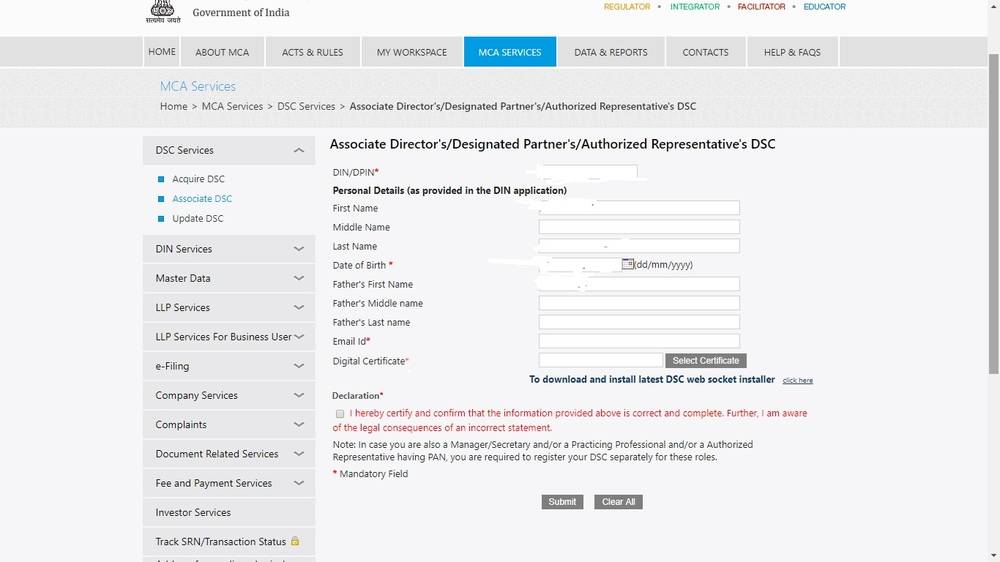
Step 6: Accept the declaration that you have provided the correct and complete information by checking the box.
Step 7: Insert the DSC to be registered on MCA portal into the USB drive on your computer.
Step 8: You will now see the window which will prompt you to select the Digital Signature of the concerned person, enter DSC password and associate.
Step 9: Click on submit button. A congratulatory message will be displayed.
“Congratulations your DSC has been successfully associated with the MCA’
ROC filings without the last-minute DSC panic
An expired or unregistered DSC on the due date stops every MCA filing. We keep director certificates current and handle the full secretarial calendar. See digital signature certificates, business compliance, and the list of ROC forms. Book a call.
Procedures and thresholds change. This article is general information, not advice on a specific matter; please confirm the current position before acting.
